Product Demo Video: From Hero Shot to Close-Up
A five-shot template for product launch video that works across e-commerce and paid social placements.
Product Demo Video: From Hero Shot to Close-Up
Every product launch needs a demo video that works across the e-commerce page, the paid social slot, and the email teaser. Three placements, three different crop and duration constraints, but one asset pipeline if you design it right.
The trick is a shot list built to survive recutting. Five shots, each with a specific job. Cut them together for the full demo, pull any single shot as a standalone, and the brand holds.
The five shot template
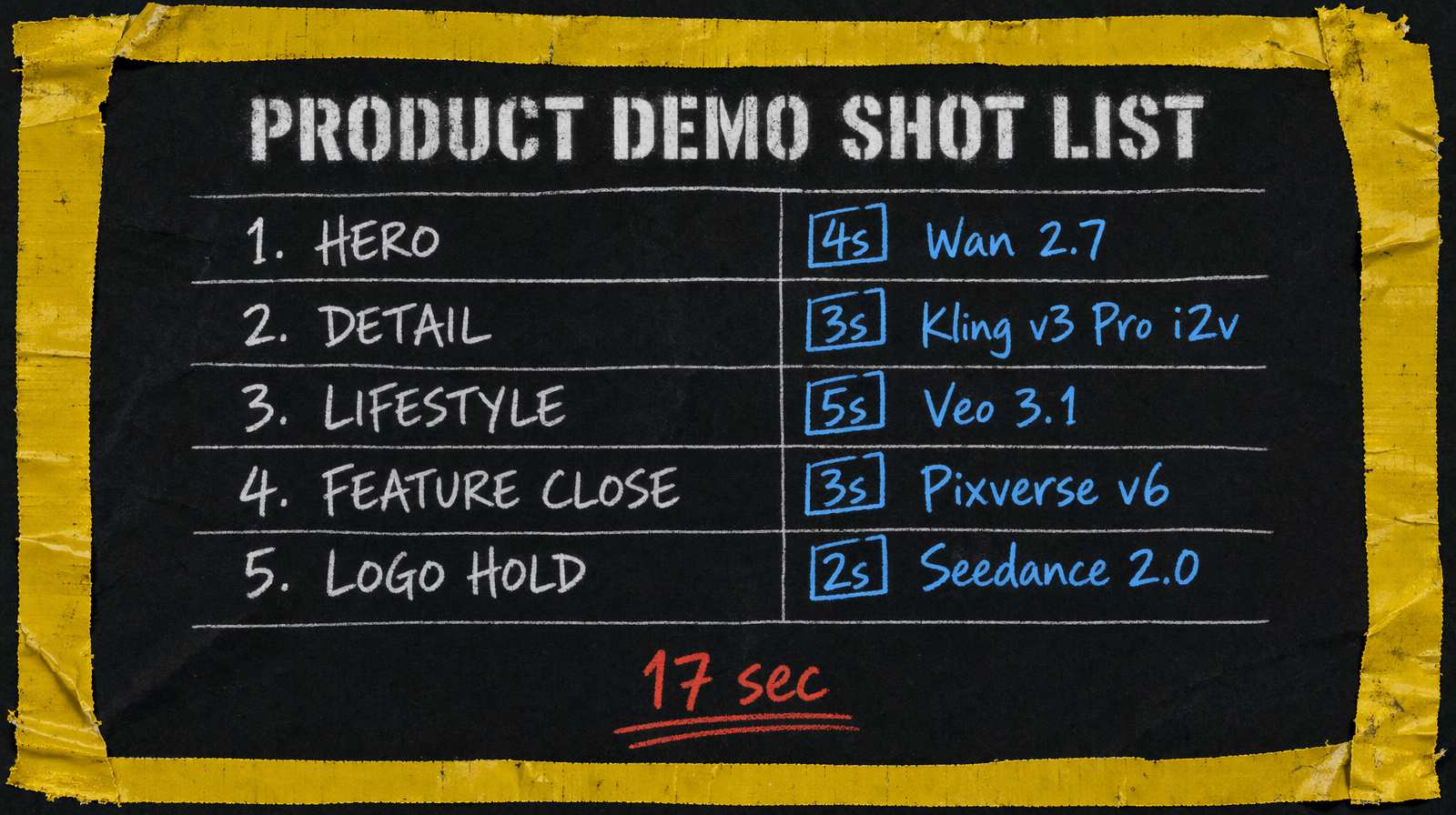
Shot 1 is the hero. Product in 3/4 view, subtle motion, controlled background. 4 seconds. This is the frame that sells the email teaser and the carousel thumbnail.
Shot 2 is a detail. A specific feature, close framing, shallow depth of field. 3 seconds. This is where the product justifies its price.
Shot 3 is lifestyle context. Product in use, human hand optional but never a full face if you can avoid it. 5 seconds. This is the paid social winner.
Shot 4 is a feature close up. Interface, texture, moving parts. 3 seconds. Pulls double duty as landing page gif.
Shot 5 is a logo hold. Product with brand mark in frame. 2 seconds. Always the end card.
Total 17 seconds cut together. Any shot works as a 3 to 5 second standalone.
Model picks per shot
Wan 2.7 at $0.10 per second for the hero. The photoreal quality and the ability to handle specific product geometry (with a reference image) is the combination you need.
Kling v3 Pro at $0.14 per second with image to video for the detail shot. The i2v path means you can upload a product photo and direct the motion rather than fighting the text prompt.
Veo 3.1 at $0.40 per second for the lifestyle. Expensive, yes, but this is the shot that runs on paid social and it needs to survive review from media buyers.
Pixverse v6 starting at $0.03/sec (360p no audio, scaling to $0.12/sec for 1080p with audio) for feature close ups. The low cost lets you generate four takes on different angles and pick.
Seedance 2.0 with unit based billing for the logo hold. Short, simple, inexpensive.
Prompting patterns for products
Every product prompt has three parts you must nail. The surface material (matte, glossy, brushed, soft), the environment (studio seamless, neutral desk, lifestyle context), and the motion verb (rotating slowly, catching light, revealing contour).
Do not prompt for brands. Do not prompt for logos (overlay in post). Do not prompt for text on the product (it will render badly). If your product has important text, shoot the text in a separate still image composite.
Lock seeds once you have a look you like for the hero. Then vary only the lighting phrase for takes 2 and 3. You will find that seed plus product description gives you about 70 percent look consistency, and the lighting variation gives you the selection you want without chaos.
Typical cost
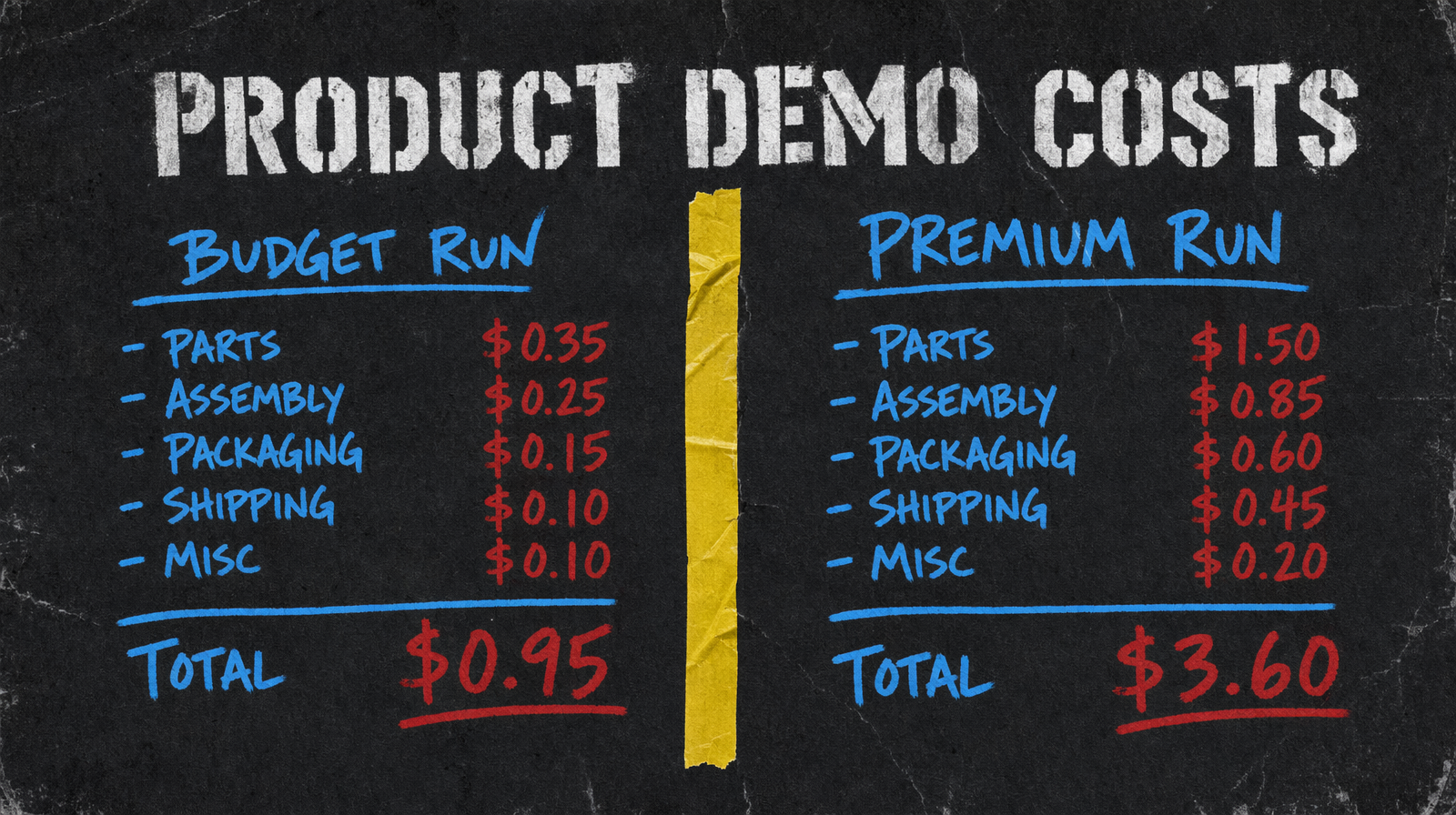
Budget run: Wan 2.7 hero 4s = $0.40, Pixverse details 3 x 3s at 360p no audio = $0.27 (3 x 3 x $0.03), Seedance logo around $0.05, total around $0.72. Call it $1.20 with a couple retakes.
Premium run with Veo on lifestyle: add $2 per Veo clip, plus Kling detail, total lands around $3.60 for a polished demo.
Common failure mode
The biggest miss is generating the product with a slightly different shape across shots. Fix with an image to video workflow on all shots that feature the product. Feed the same reference photo, vary the motion prompt. The product stays exactly itself. Text to video is tempting because it is cheaper, but the consistency gap costs you more in retakes than the i2v costs in generation.
The second miss is generating with branded elements in the background. Dial it back to generic spaces. Let the product be specific, let everything else be forgettable.