Game Cinematics: Pre-Vis to Key Art in One Pipeline
How indie game teams use fal models for concept pre-vis, trailer shots, and marketing key art in a single workflow.
Game Cinematics: Pre-Vis to Key Art in One Pipeline
Indie game studios have a specific problem AI video is tailor made for. You need concept pre vis, trailer shots, and marketing key art, but you do not have the budget or the time for a traditional animation pipeline. You also do not want every asset to look different because the visual identity matters.
The workflow that solves this uses the same prompt language and reference images across every stage of the pipeline. One visual identity, four different output formats.
The stages
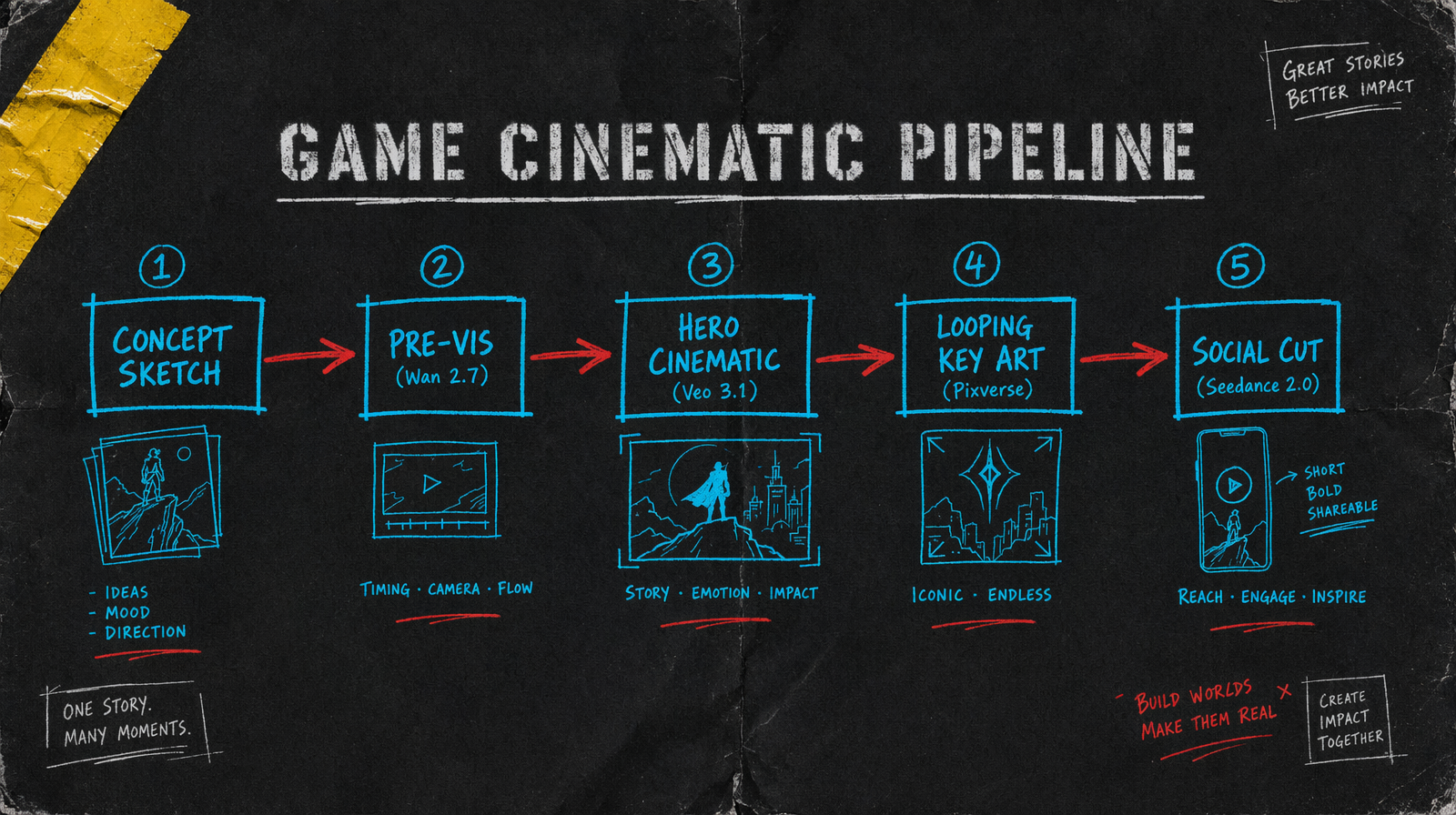
Five stages, each with a clear output and a model fit.
Concept sketch stage is a pencil or painted mood board. This is not generated video. It is the direction you will feed into every subsequent prompt. Humans still do this.
Pre vis stage takes those sketches and generates animated blocking. Rough characters, rough environments, clear camera intent. This is internal reference, not shipped content.
Hero cinematic stage takes pre vis that was approved and produces the real cinematic shots. These go in the trailer.
Looping key art stage takes a single hero frame from the cinematic and turns it into a loopable animation for store pages, Steam capsules, social headers.
Social cut stage remixes the hero cinematic into a 15 second vertical edit for TikTok and Shorts.
Model picks by stage
Wan 2.7 at $0.10 per second for pre vis. Quality is fine for internal reference, pricing lets you iterate on blocking without anxiety. Text to video works here because the output is a sketch, not the final.
Veo 3.1 at $0.40 per second for hero cinematics. This is where you spend. Two to four shots at 6 to 8 seconds each, $2 to $4 per shot. These are your trailer keepers.
Pixverse v6 starting at $0.03/sec (360p no audio, scaling to $0.12/sec for 1080p with audio) for looping key art. Feed the hero frame as an image to video seed and generate a 4 second loop. Pennies per capsule.
Seedance 2.0 with unit based billing for social cuts. Unit pricing works well when you need to generate 3 or 4 variants for different platforms.
Prompting for visual identity
Lock a style phrase and use it in every prompt. Something like "stylized stealth noir, desaturated palette with neon accents, soft volumetric lighting, slight anamorphic lens distortion". This phrase goes at the start of every prompt across all five stages.
Maintain a character reference image set. Even if your character model is not final, a single concept render used as i2v reference across every hero shot gives you consistency the text prompt cannot.
Environment references matter as much as characters. If your game is set in a specific visual world, a mood board of three locations fed as image references produces output that matches your art direction instead of generic AI fantasy.
Budget for a trailer
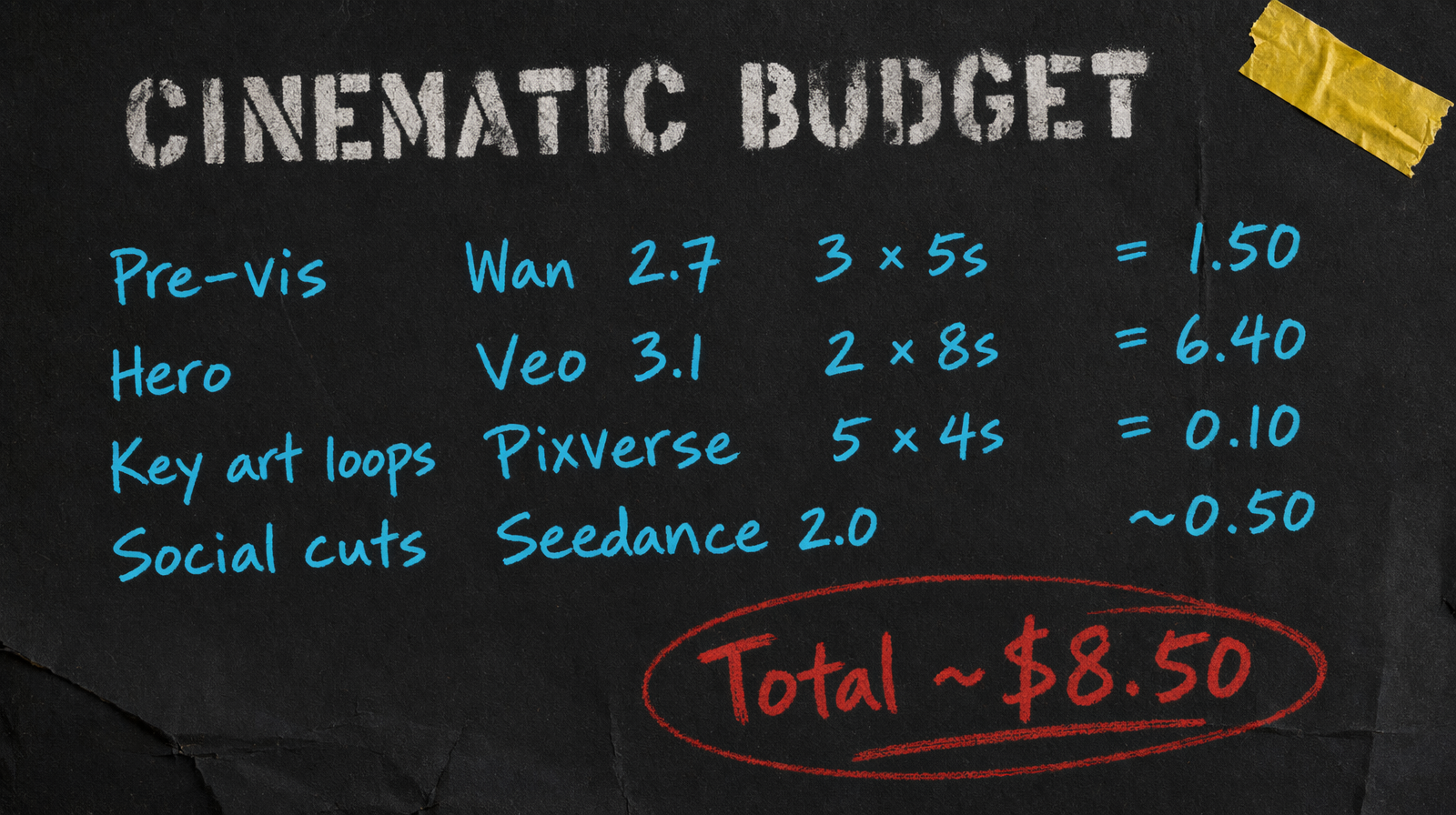
A typical indie game trailer cycle might include 6 pre vis shots, 4 hero cinematics, 5 key art loops, and 3 social cuts.
Pre vis: 6 x 5s Wan 2.7 = $3.00. Hero: 4 x 8s Veo 3.1 = $12.80. Key art: 5 x 4s Pixverse at 360p no audio = $0.60 (5 x 4 x $0.03). Social: 3 cuts Seedance 2.0 unit based ~$1.50. Total around $17.90 before iteration, expect $40 to $60 with revisions.
Common failure mode
The biggest failure is trying to use AI for in game assets instead of just for marketing and cinematic pieces. AI video does not slot into a real time engine pipeline. It is a render output, not a material. Use it for the stuff that ships as video, keep your in game visuals in your engine.
The second failure is skipping pre vis. Teams try to jump straight to hero cinematics and end up spending Veo budget on shots that do not serve the story. Pre vis at Wan pricing is cheap. It tells you which shots are worth the Veo investment. Skip it and you will spend 3x what you needed to.
The last thing to watch is character face consistency across shots. Always i2v for character features, never pure text to video. Faces are the tell that separates "this looks like a real studio made it" from "this is clearly AI". Image references solve it. Text prompts do not.