News B-Roll: Fast Generation for Breaking Content
Templates for the handful of scene types news teams need on deadline. Focus is wall-clock speed, not fidelity.
News B-Roll: Fast Generation for Breaking Content
News teams are not trying to win awards with their b-roll. They are trying to not have a blank rectangle on air while the anchor reads copy. Different problem, different pipeline.
The constraint is wall clock time to usable clip. You need a shot in under 3 minutes from the moment you realize you need it. That rules out most of the high quality models and it changes the prompting style.
The templates you actually need
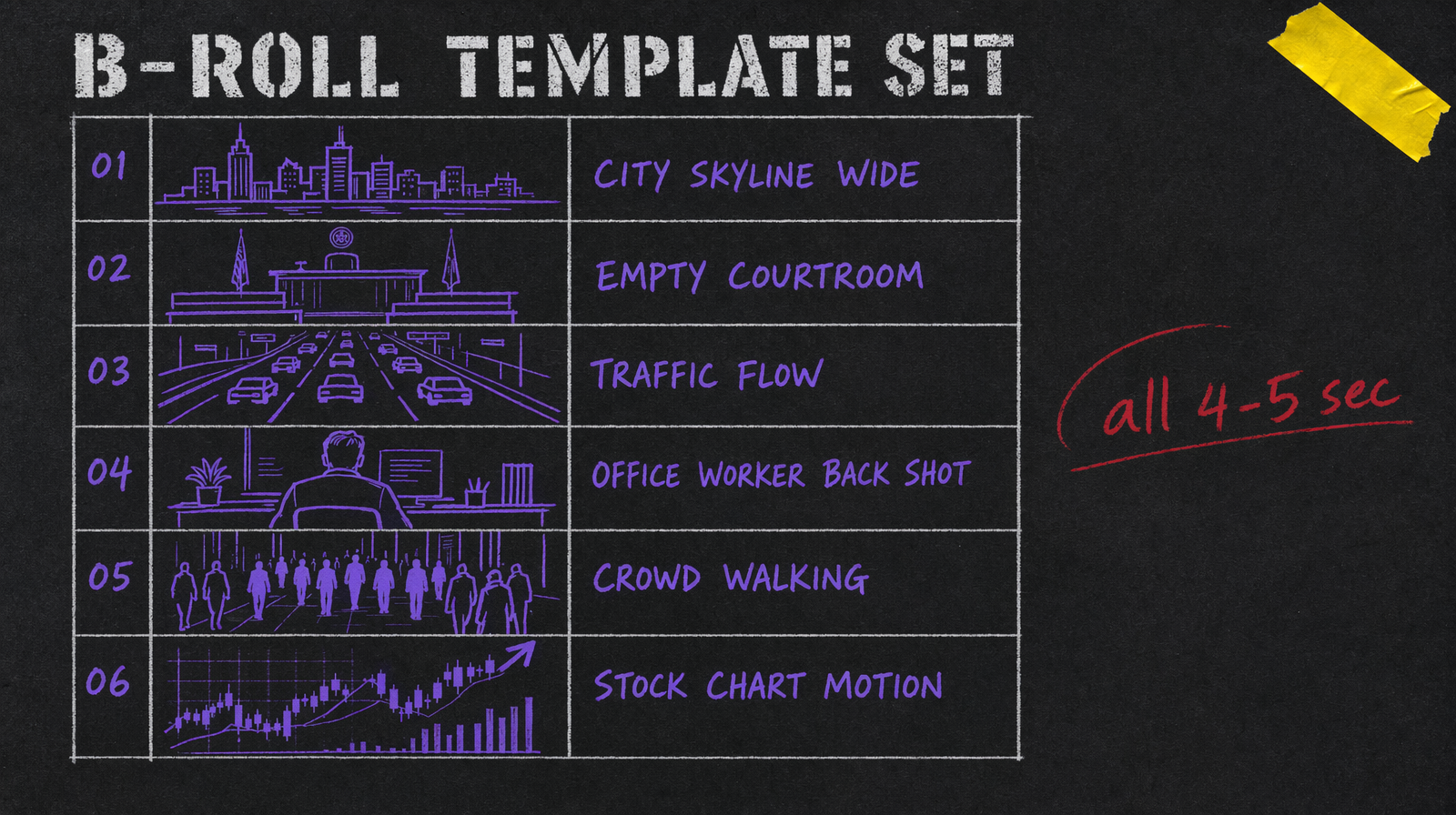
Six templates cover about 80 percent of news b-roll needs. City skyline wide (establish location). Empty courtroom or government building (legal stories). Traffic flow (commuter, economy, infrastructure). Office worker from behind (business, tech, employment). Crowd walking (demographics, consumer, urban life). Stock chart motion (markets, economic reporting).
Keep them short, 4 to 5 seconds. News editors always ask for shorter. Nobody ever asks for longer.
Models that hit the deadline
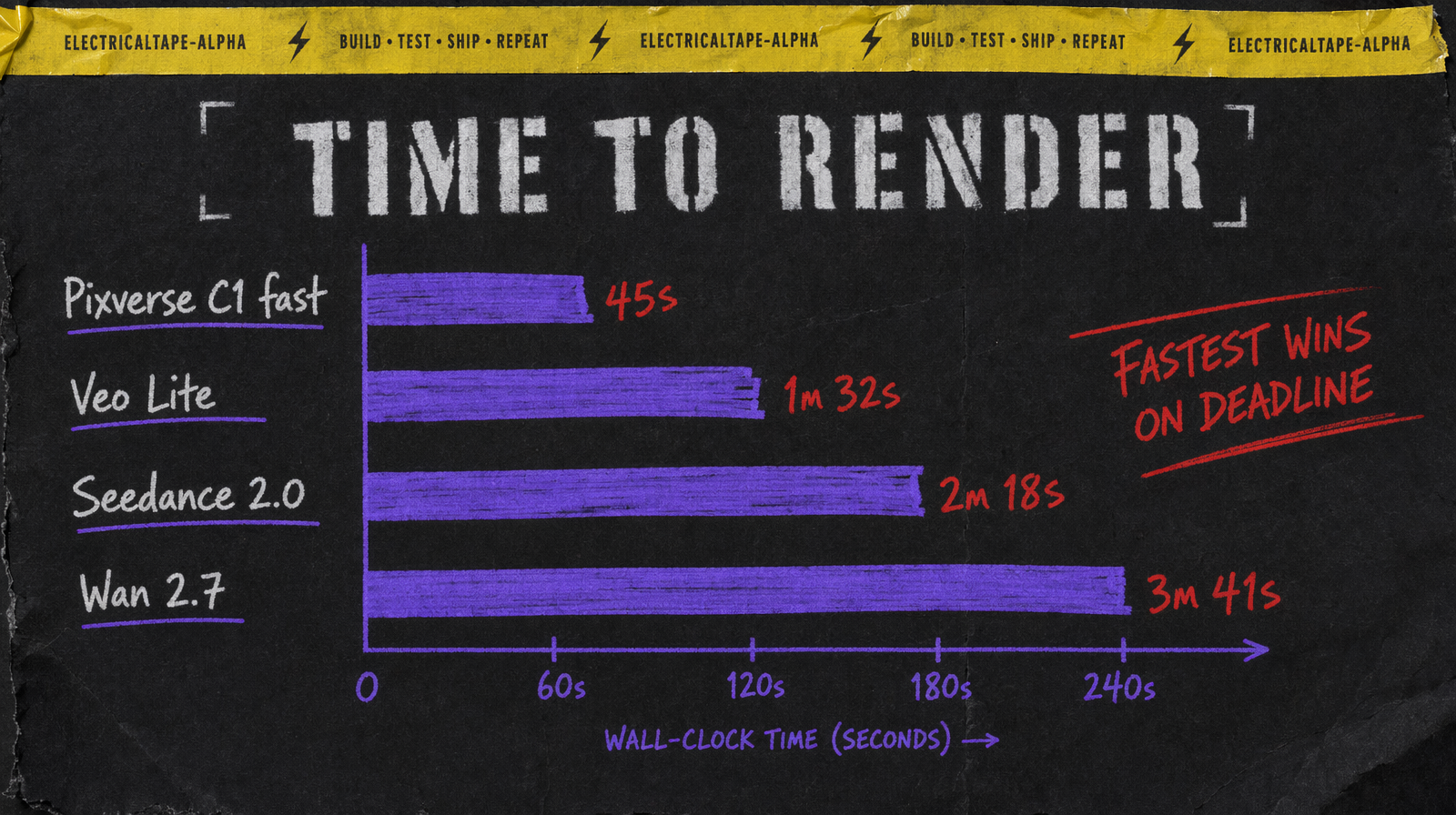
Pixverse C1 starting at $0.03/sec (360p no audio, scaling to $0.12/sec for 1080p with audio) is the fastest tier that still produces usable quality. For 4 second b-roll at 360p no audio you are looking at around $0.12 per clip (4 x $0.03) and often under 30 seconds wall clock to result.
Veo Lite at $0.05 per second is the upgrade when the b-roll needs to hold up at larger sizes or in broadcast. Still fast, still cheap, noticeably better.
Seedance 2.0 with unit based billing is worth considering when you need three takes on the same scene to pick the best. The unit pricing is forgiving of iteration.
Wan 2.7 at $0.10 per second is reserved for the rare story where b-roll quality matters. Scheduled segments, not breaking.
Prompting for speed
Keep prompts short. Under 20 words. Models run faster on shorter prompts, and for b-roll you do not need nuance. "Empty federal courtroom, wooden benches, afternoon light through tall windows". Done.
Skip negative prompts unless you have a specific problem. The overhead of including them slows generation slightly on some models and for b-roll you are throwing out bad takes anyway.
Do not prompt for specific identifiable buildings. You want a generic courtroom, not the Supreme Court. Same for skylines, pick a style ("Midwest skyline at dusk") not a city.
Submit patterns
Submit three versions of a prompt at once. For b-roll, take whichever completes first that passes a sanity check. The other two you cancel or let run and save for tomorrow. Parallel submission is cheaper than serial iteration when speed matters more than cost.
Keep a pre warmed submission. At the start of a shift, submit a generic skyline and a generic office scene. When news breaks, you already have a usable clip while you generate the specific one.
Cost per story
A breaking news segment might use 4 to 6 b-roll shots. At Pixverse C1 (4 second shots at 360p no audio) that is $0.48 to $0.72 in generation. Even on a high volume news operation running 20 segments a day, you are around $15 a day in b-roll cost. That is about 1 percent of what a stock footage subscription costs.
Common failure mode
The failure is generating something so generic it does not match the story. A clip of "people walking" paired with a story about housing policy looks lazy. Prompt the b-roll to imply the story subject without being too literal. "People walking past For Rent signs in a neighborhood" works. "A housing crisis protest" does not, because the model will put text on signs that will embarrass you.
The other failure is over editing b-roll. It is background. Grade it neutrally, cut it on breaths in the anchor copy, let it do its job.