Aspect Ratios by Platform: A 2026 Map
TikTok, YouTube Shorts, Reels, X, standalone web, connected TV. Ratios, safe zones, and which fal models hit each.
Aspect ratio is a routing decision. You cannot ship 16:9 to TikTok and expect the algorithm to treat it like a native post. You cannot ship 9:16 to a 4K TV and expect it to not look like a phone held sideways. Pick the ratio before you render.
Here is the 2026 map. Ratios, safe zones, and which fal models can actually hit each.
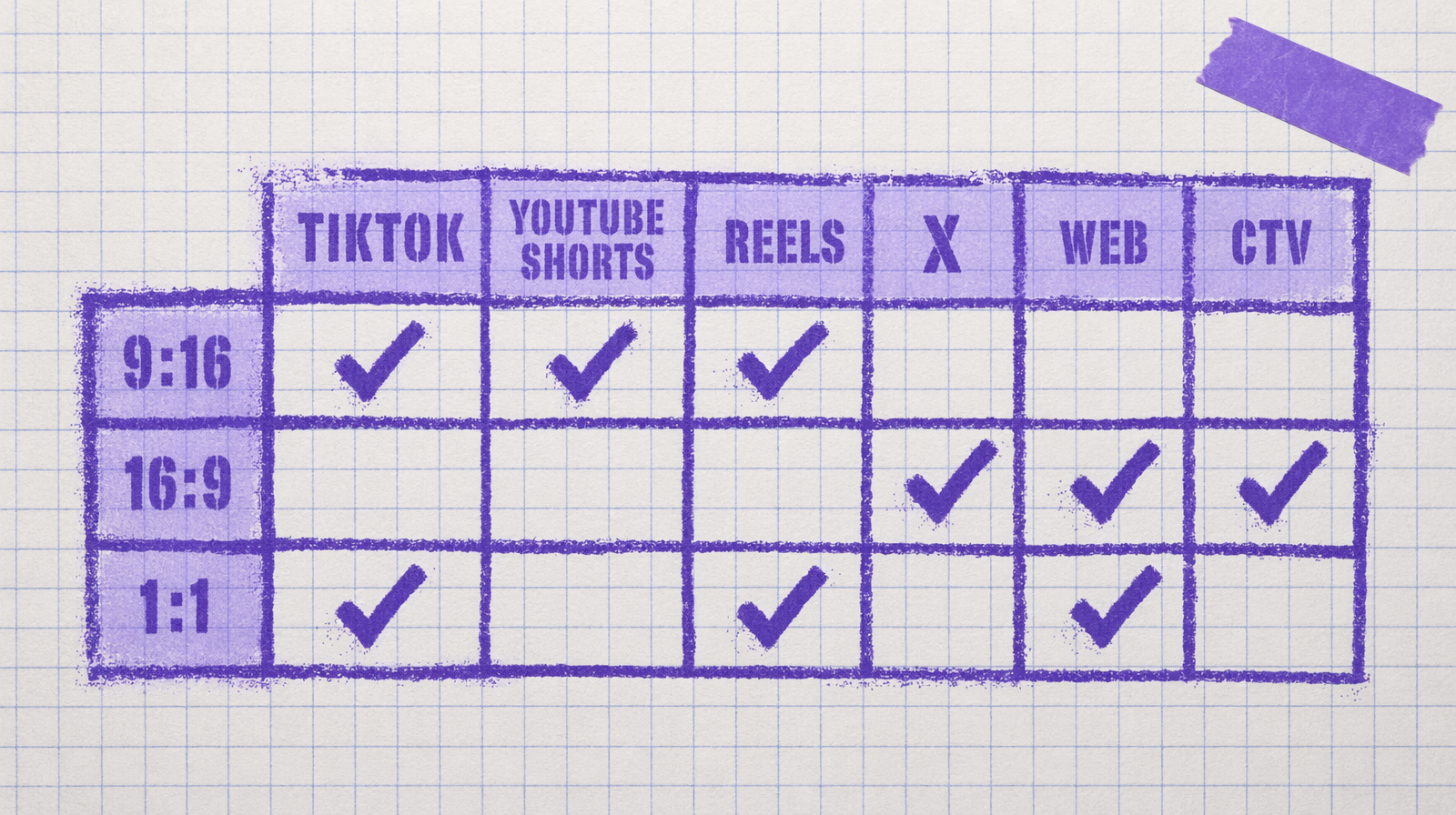
The short list
- TikTok, Reels, Shorts: 9:16 is native. 1080x1920. Keep text out of the top 15 percent and the bottom 20 percent because that is where the UI lives.
- YouTube main feed: 16:9 is still the base. 1920x1080 at minimum.
- X video: 16:9 or 1:1. 1:1 actually outperforms 16:9 in the feed on many accounts.
- Standalone web: 16:9 is safest. 21:9 looks premium but cuts off on mobile.
- Connected TV and OTT: 16:9 only. 1080p minimum, 4K preferred.
What each model actually supports
Wan 2.7 text to video: 16:9, 9:16, 1:1, 4:3, 3:4. Five ratios in one endpoint. If you need to cover multiple platforms from one source, this is the pragmatic pick at $0.10 per second.
Veo 3 Fast: 16:9 and 9:16 only. No squares, no cinematic. At $0.40 per second with audio baked in, it is pricy enough that you do not want to crop to a square in post and waste pixels.
Kling v3 Pro: 16:9, 9:16, 1:1. Three ratios. $0.14 per second.
Seedance 2.0: 21:9, 16:9, 4:3, 1:1, 3:4, 9:16, plus auto. The widest menu. At $0.014 per unit, it is the cheapest path to ratio variety.
Pixverse v6 and C1: 9:16 and 16:9 starting at $0.03/sec (360p no audio, scaling to $0.12/sec for 1080p with audio). The budget option for socials.
A rendering pattern for multi platform delivery
1import fal_client23PLATFORMS = [4 ("tiktok", "9:16"),5 ("youtube", "16:9"),6 ("x_square", "1:1"),7]89prompt = "aerial drift over a rainy city street at night, neon signs reflecting"1011for name, ratio in PLATFORMS:12 result = fal_client.subscribe(13 "fal-ai/wan/v2.7/text-to-video",14 arguments={15 "prompt": prompt,16 "aspect_ratio": ratio,17 "resolution": "1080p",18 "duration": 5,19 "seed": 77301,20 },21 )22 print(name, result["video"]["url"])
Three ratios, same seed, same prompt. At $0.50 a clip that is $1.50 for a three platform drop.
Safe zones matter more than the ratio
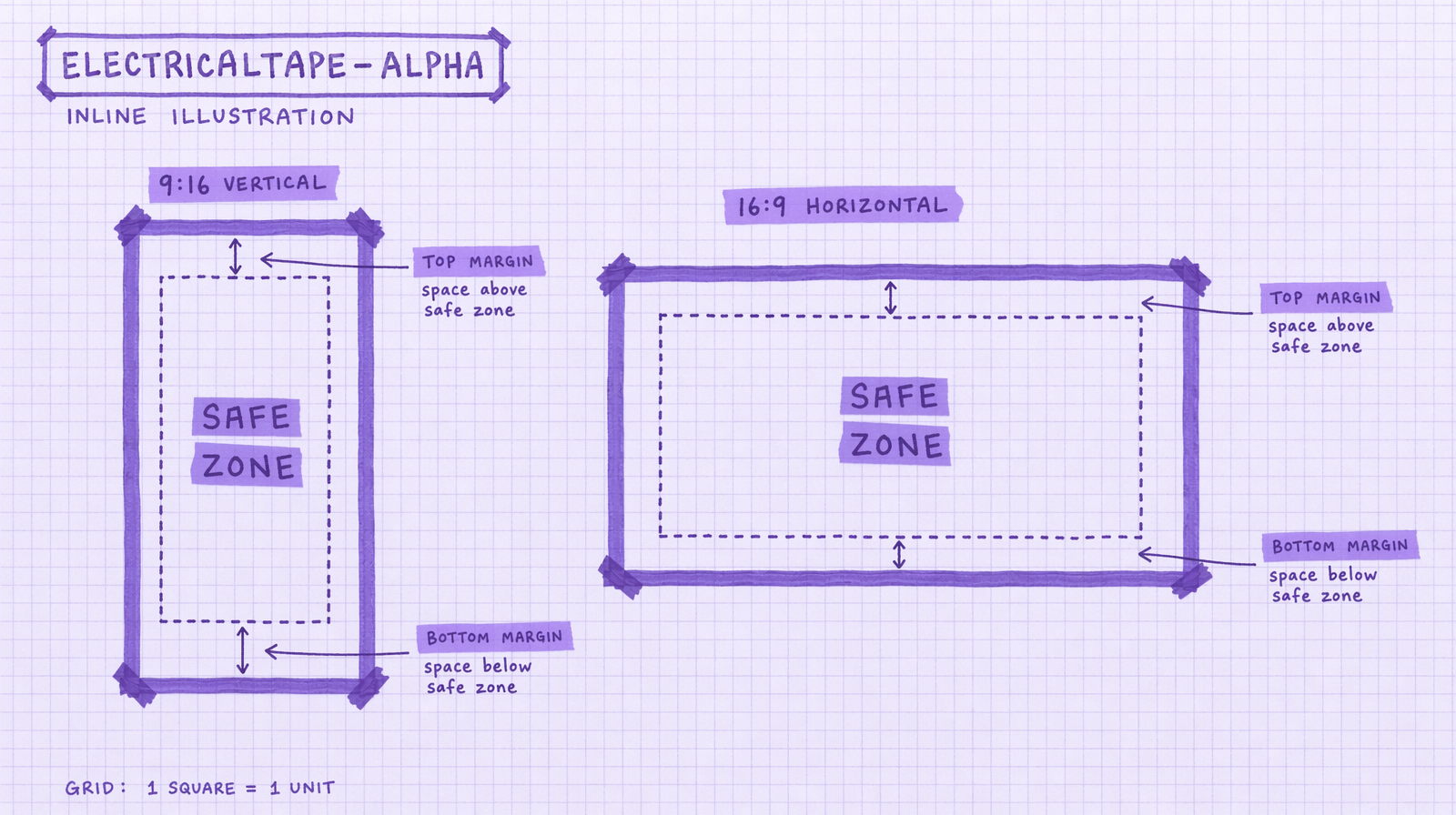
A 9:16 TikTok with your logo in the top 100 pixels is a 9:16 TikTok where nobody sees your logo. The UI chrome eats it. The rule of thumb: treat the middle 60 percent of the frame as your usable canvas. The rest is bumper.
For horizontal 16:9, the safe zone is the center 80 percent. TV overscan still matters on older panels.
When auto is fine
Seedance has an auto mode. Use it when you are exploring a concept and the ratio is not the point. Do not use it for delivery. Delivery needs a known ratio for the cutdown.
The cost of getting it wrong
Re-rendering because you shipped the wrong ratio is double payment. Five seconds of Wan 2.7 at $0.10 per second is $0.50 per re-render. Do that three times in a campaign and you just bought yourself lunch for nothing.