Camera Movement Vocabulary That Models Recognize
Dolly, truck, crane, push-in, pull-out. Which terms land, which do not, and which are model-specific.
Not every camera move lands in every model. The vocabulary you picked up watching DP reels does not map one to one to what the video samplers understand. Some terms are reliable, some are model specific, and a few are just decorative.
Here is what actually works in late 2026.
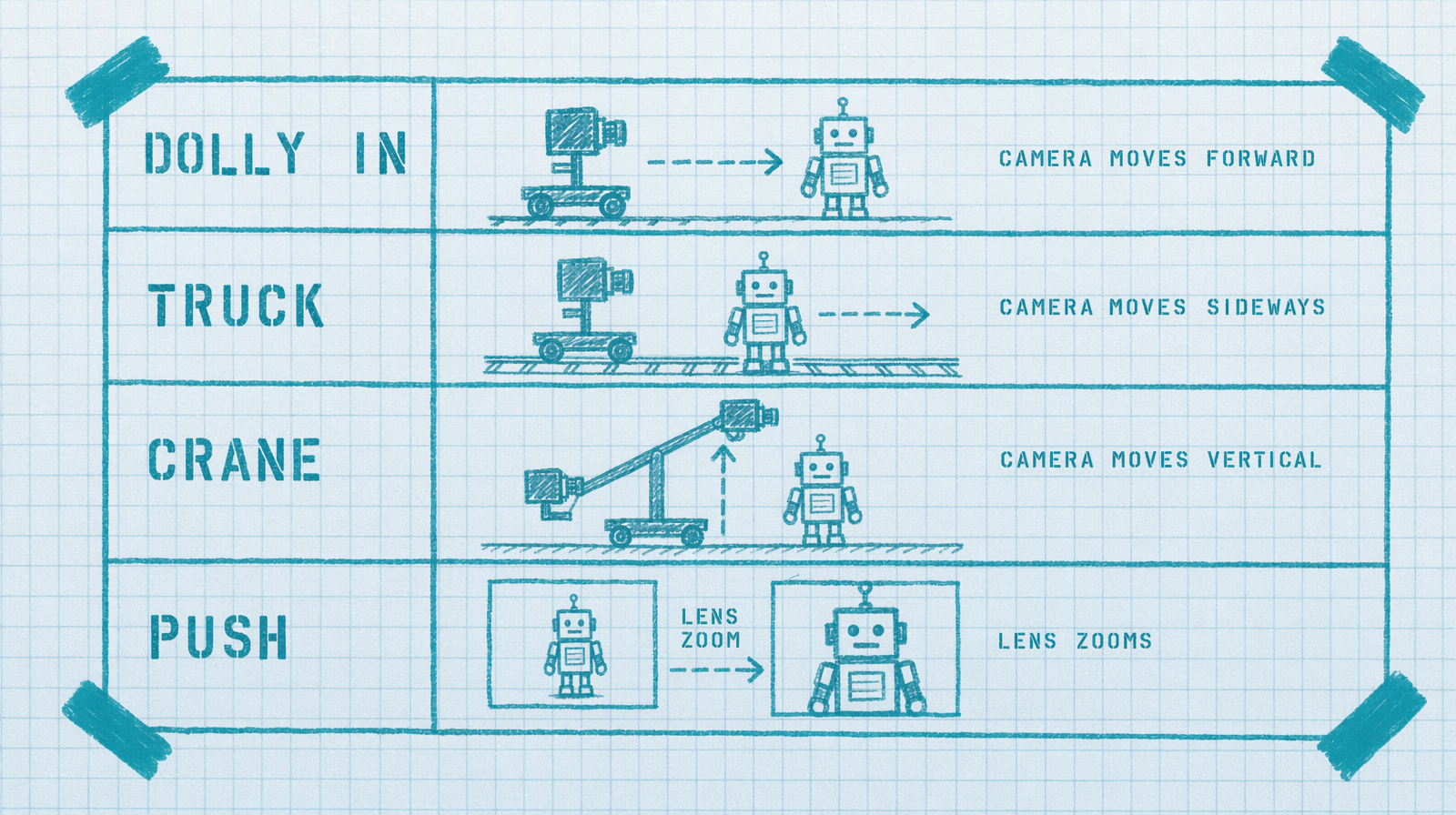
Terms that land almost everywhere
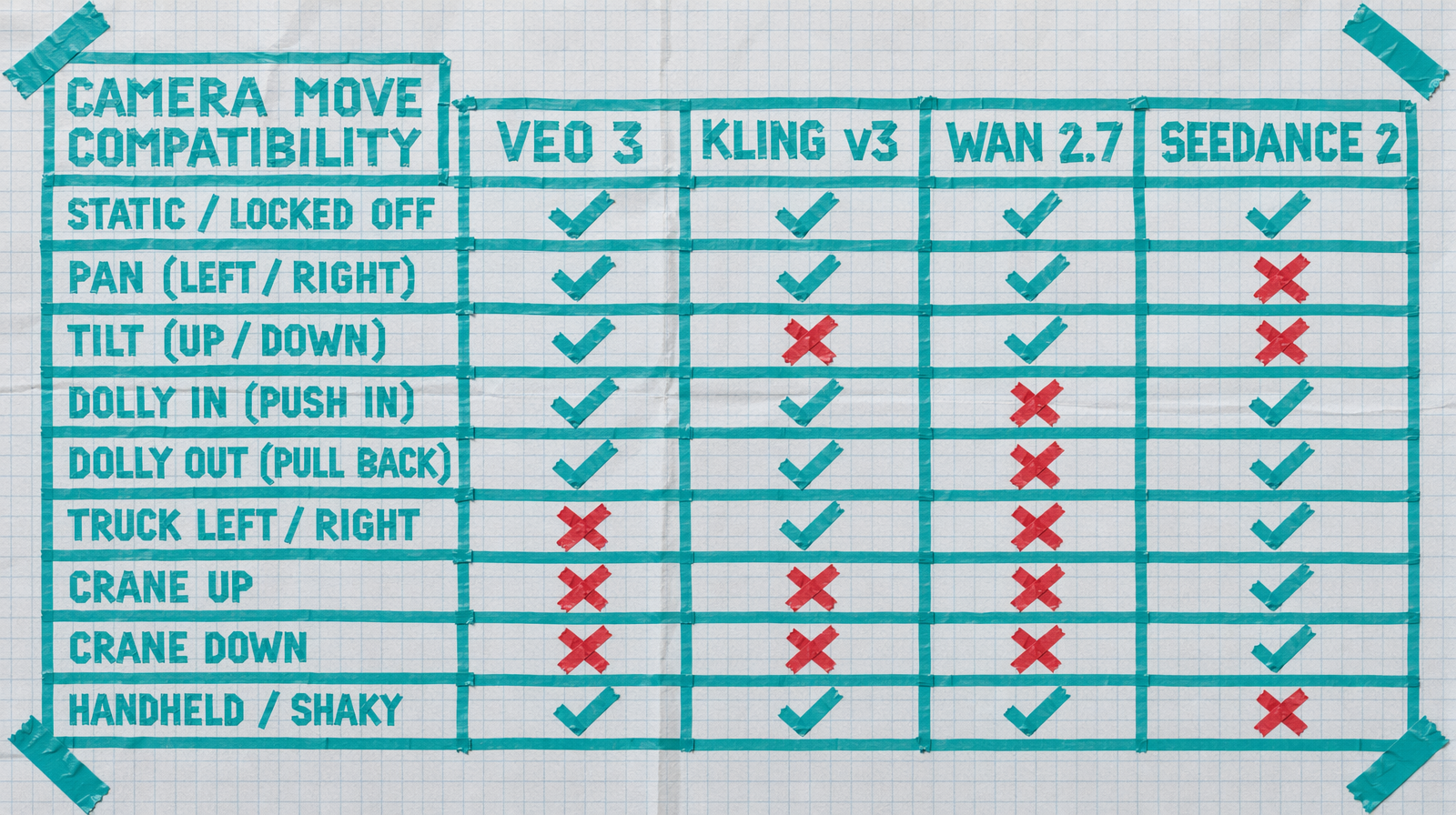
"dolly in" and "dolly out" work on Wan 2.7, Veo 3 Fast, Kling v3 Pro, and Seedance 2.0. The camera moves physically toward or away from the subject. Distinct from zoom, and the models know the difference when you use the words precisely.
"pan left" and "pan right" land. The camera rotates horizontally from a fixed position.
"tilt up" and "tilt down" land. Vertical rotation from a fixed position.
"push in" and "pull out" land. Often interpreted the same as dolly in and dolly out, but add a mild zoom effect on some models. Safe to use interchangeably.
"tracking shot" lands. The camera moves alongside the subject.
Terms that are more fragile
"crane" and "jib" are hit or miss. Veo 3 Fast handles them well. Wan 2.7 sometimes renders a static wide when you ask for a crane move. Be ready for that.
"truck left" and "truck right" (lateral translation of the camera) are understood by Kling and Seedance, less reliably by Wan. If you need a truck move in Wan, prefer "camera slides left."
"boom" for vertical elevation is inconsistent. Use "camera rises vertically" or "camera descends" instead.
Terms I would skip
"Steadicam" as a camera language does not add anything. It tells you about the rig, not the motion. The sampler does not need to know what rig you imagined.
"handheld" does sometimes work as a mood word, adding micro jitter. But it also sometimes introduces motion blur and warping. Risky for delivery, fine for exploratory.
"snorricam" and other specialty rigs. No.
Combining moves
You can stack two moves in one clip. "a slow dolly in and a simultaneous tilt up to reveal the skyscraper" works on Veo 3 Fast and Kling. Wan 2.7 tends to pick one. When you stack moves, make the primary one first in the sentence.
Speed modifiers
"slow" and "fast" land across all four major models. "gentle" softens the move. "aggressive" rarely produces the crash zoom you are imagining. Use "fast" instead.
"steady" implies a locked off or gimbal stabilized move. Useful if your subject is moving and you want the camera to behave.
A drop in snippet
1import fal_client23CAMERA_TEMPLATES = {4 "reveal": "slow dolly in and gentle tilt up",5 "follow": "steady tracking shot from the side, matching walking pace",6 "search": "slow pan left across the room",7 "introduce": "wide establishing, then slow push in toward the subject",8}910def render(model_id, subject, camera_key):11 return fal_client.subscribe(12 model_id,13 arguments={14 "prompt": f"{subject}, {CAMERA_TEMPLATES[camera_key]}",15 "duration": 5 if "wan" in model_id or "kling" in model_id else "6s",16 "aspect_ratio": "16:9",17 },18 )1920shot = render("fal-ai/kling-video/v3/pro/text-to-video",21 "a detective walks down a neon lit alley",22 "follow")
Kling v3 Pro at $0.14 per second for 5 seconds is $0.70 per shot. Wan 2.7 at $0.10 per second is $0.50. Both honor the templates above reliably.
The cheap test
If you are not sure a camera term works on a specific model, burn a 2 second Wan 2.7 render at $0.20 with just the camera move and a neutral subject. You will know in one clip whether the model recognizes the term or renders a static frame. Two bucks buys you a full vocabulary chart in ten renders.