Which fal.ai Models Support Negative Prompts
Negative prompts are not universal. A capabilities matrix and a workaround pattern for the models that lack them.
The verdict up front
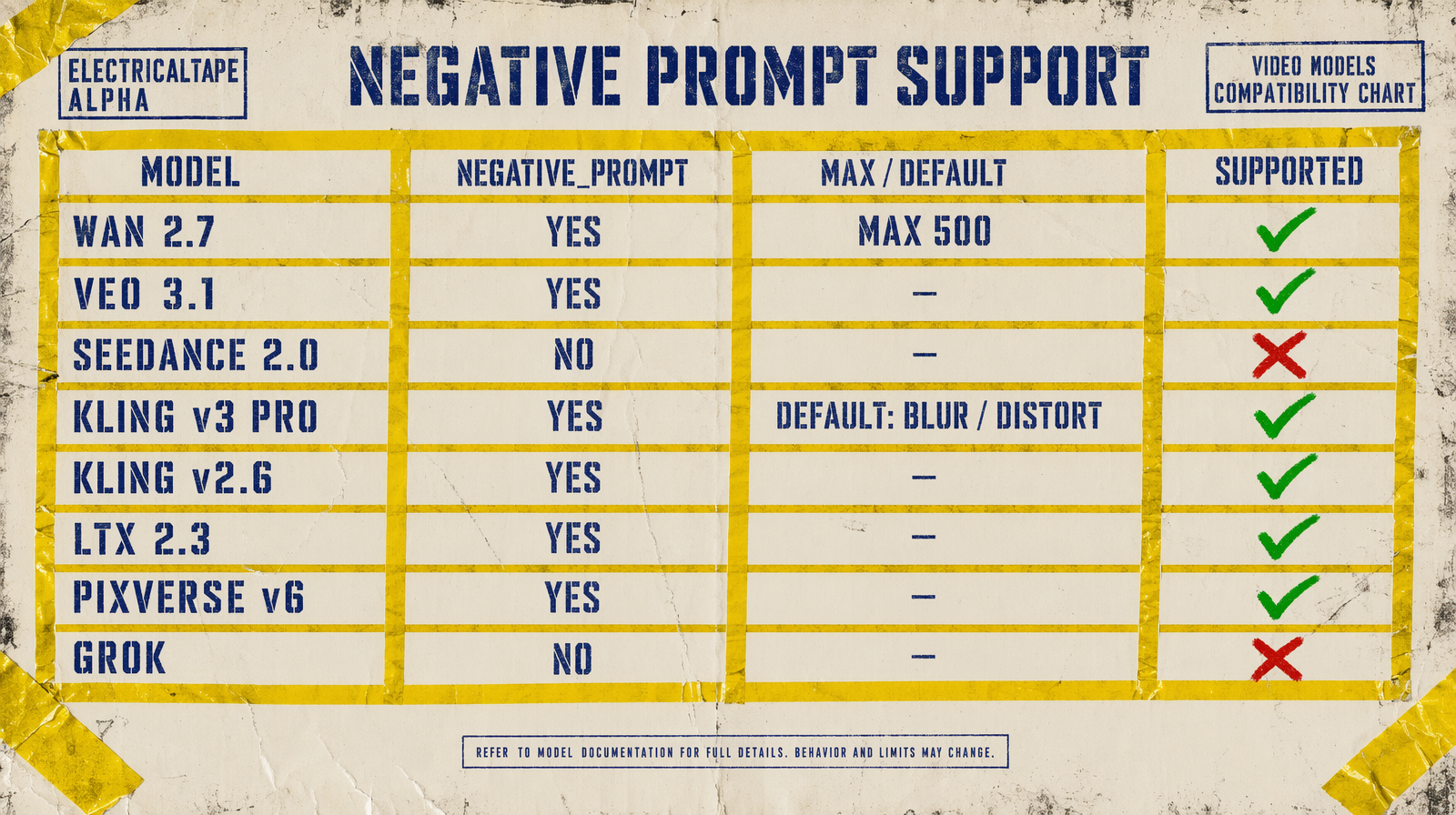
Six fal.ai video models expose a negative_prompt parameter. Seedance 2.0 and Grok Imagine do not. If you rely on negative prompts to suppress artifacts (extra fingers, warping, watermarks, text overlays), your model selection narrows fast. For the models that lack the field, there is a workable three-step pattern.
The compatibility matrix
| Model | negative_prompt field | Default value | Character cap |
|---|---|---|---|
| Wan 2.7 | yes | none | 500 chars |
| Veo 3.1 | yes | none | no documented cap |
| Veo 3.1 Fast | yes | none | no documented cap |
| Kling v3 Pro | yes | `blur, distort, and low quality` | no documented cap |
| Kling v2.6 Pro | yes | `blur, distort, and low quality` | no documented cap |
| LTX 2.3 | yes (via prompt guidance) | n/a | n/a |
| Pixverse v6 | yes | none | long default example provided |
| Pixverse C1 | not exposed | n/a | n/a |
| Seedance 2.0 | not exposed | n/a | n/a |
| Grok Imagine | not exposed | n/a | n/a |
The cap matters. Wan 2.7 explicitly limits negative_prompt to 500 characters. If you were carrying a 1200-character negative list from another pipeline, it will not fit.
Why the cap on Wan matters
A habit forms where engineers copy a giant negative list between models. The list starts as "extra fingers, deformed hands, neck warping" and grows to 1500 characters of adjectives: ugly, bad, low quality, amateur, grainy, distorted. The tail end is noise. Wan 2.7 forces you to trim.
What fits in 500 characters and actually helps:
1extra fingers, deformed hands, neck warping, duplicate limbs, flickering, watermark, text overlay, blurry face, extra eyes, face morphing
What you can drop because it does nothing: bad, ugly, low quality, amateur, poorly lit. These are abstract adjectives with no useful prior in the model.
The workaround for models without negative prompts
Seedance 2.0 and Grok Imagine do not accept a negative prompt. You have three levers to compensate.
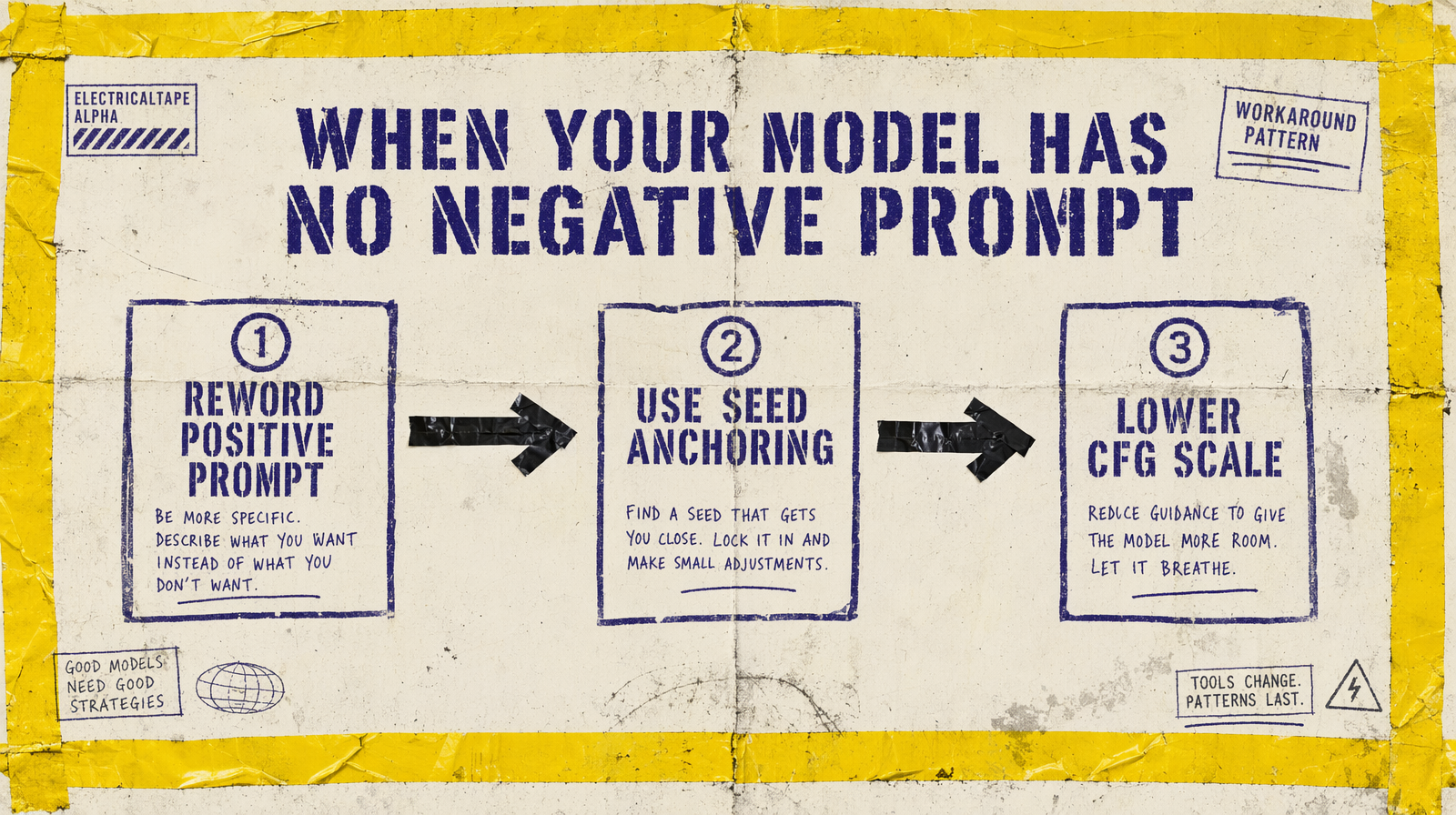
1. Reword the positive prompt. Instead of "a chef cooking, negative: extra fingers," write "a chef with visible, well-defined hands holding a single pan." You are describing what you want in a way that implicitly excludes the failure.
2. Anchor the seed. Seedance 2.0 accepts a seed parameter. Grok Imagine does too. Once you have a clean render, log the seed. Re-use it for follow-up generations with minor prompt tweaks. The base physics stays stable, the mechanical failures do not re-appear.
3. Lower CFG scale where available. Not every model exposes it, but Kling v3 Pro does. A lower CFG lets the model deviate from the prompt slightly, which can release it from pathological fixations. Default 0.5, try 0.3 if a seed keeps producing the same artifact.
Where negative prompts actually pay off
For the models that support them, negative prompts help most with:
- Hand and finger artifacts (extra, deformed, duplicated).
- Text and watermark overlays on generated frames.
- Face morphing across frames in longer clips.
- Unwanted CGI aesthetics (
cartoon, CGI render, stock footage zoom). - Shaky handheld wobble when you wanted locked camera.
They help almost nothing for:
- Abstract style shifts ("make it more cinematic").
- Color grading requests ("less warm").
- Framing corrections ("pull back").
If your negative prompt reads like a vibe, it is not doing work.
The selection rule
If your workflow depends on negative prompts to control artifacts, your selection is: Wan 2.7, Veo 3.1, Veo 3.1 Fast, Kling v3 Pro, Kling v2.6 Pro, Pixverse v6.
If you want Seedance 2.0 or Grok Imagine, plan to spend your prompt discipline on positive rewrites and seed anchoring. They are not out of reach, they just have a different tool.