Kling v2.6 vs v3 Pro: The multi_prompt Upgrade
multi_prompt turned Kling into a native multi-shot model. A before and after of prompting discipline.
The verdict up front
Kling v3 Pro is a different tool than v2.6, not an upgrade. The multi_prompt field turns the endpoint into a native multi-shot generator with per-shot prompts and durations. If you are stitching three Kling v2.6 renders together in post, v3 Pro replaces that workflow with one request.
What changed
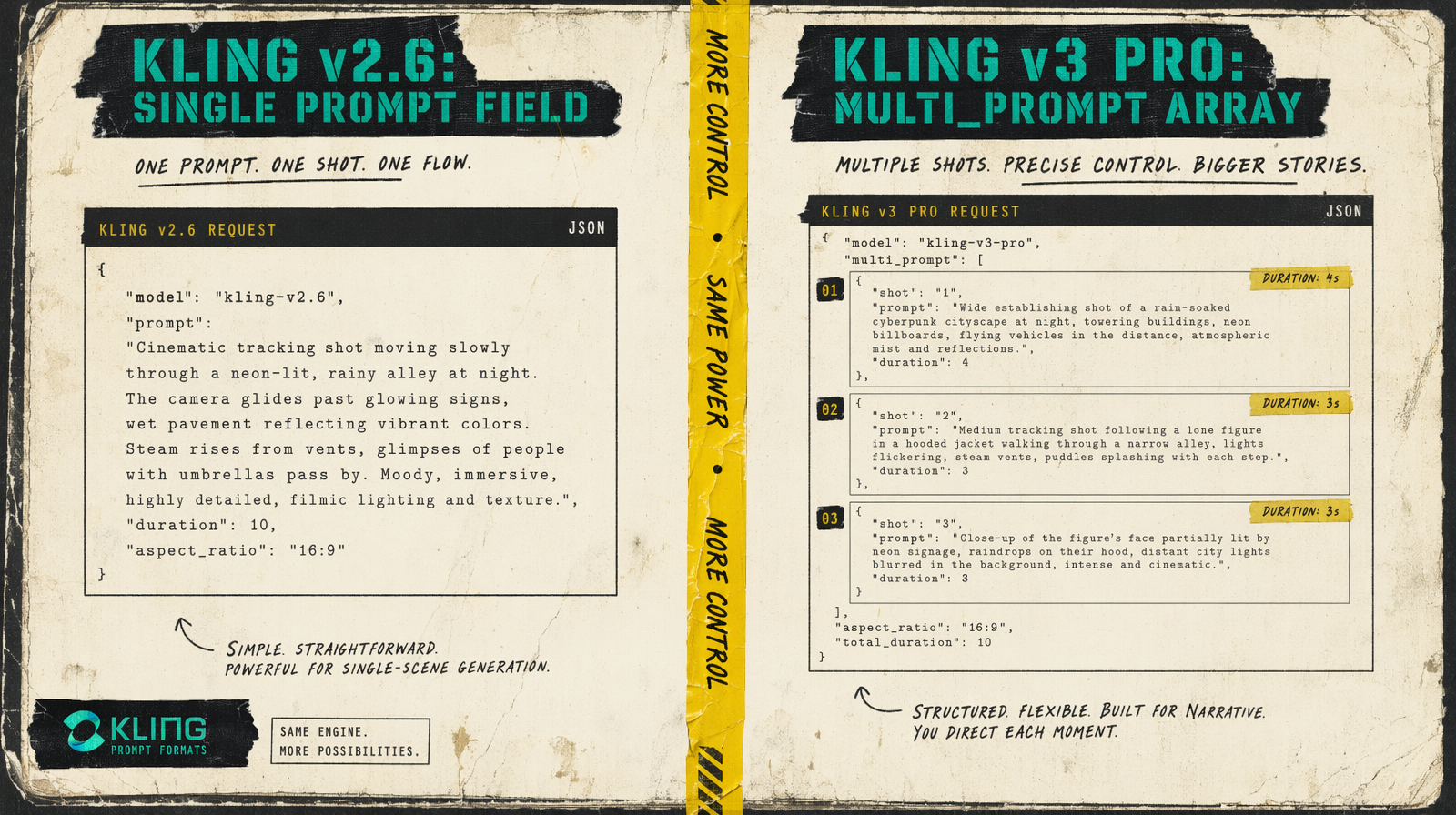
On v2.6, you had one prompt field and a duration choice of 5 or 10 seconds. That was the shape of the tool. Any narrative over two beats required multiple generations and an external editor.
On v3 Pro, you still have a single prompt for simple cases, but you also get a multi_prompt array. Each entry in that array is a shot description with its own duration. The shot_type field toggles between customize (you control shot boundaries) and intelligent (the model decides). Duration now spans 3 to 15 seconds instead of just two options.
You cannot pass both prompt and multi_prompt in the same call. Pick one.
Spec comparison from MCP
| Parameter | Kling v2.6 Pro | Kling v3 Pro |
|---|---|---|
| Endpoint | fal-ai/kling-video/v2.6/pro/text-to-video | fal-ai/kling-video/v3/pro/text-to-video |
| Price | $0.14 per second | $0.14 per second |
| prompt field | required | optional |
| multi_prompt field | not supported | list of shots with per-shot durations |
| shot_type | not supported | customize, intelligent |
| Duration options | 5, 10 | 3, 4, 5, 6, 7, 8, 9, 10, 11, 12, 13, 14, 15 |
| Aspect ratio | 16:9, 9:16, 1:1 | 16:9, 9:16, 1:1 |
| Native audio (generate_audio) | default true | default true |
| Negative prompt | yes, default blur/distort | yes, default blur/distort |
| cfg_scale | 0.5 default, max 1 | 0.5 default, max 1 |
| Released | December 2025 | February 2026 |
Price is identical. What you pay for is the structural upgrade in prompting.
How multi_prompt changes what you write
On v2.6 your prompt tried to cram a three-act scene into one block. You ended up with run-on descriptions like "a woman enters the cafe, sits at the window, then reaches for her phone" and the model would interpret that as one continuous take with no real shot changes.
On v3 Pro you write it as three entries. Shot one: "a woman enters the cafe, wide establishing shot, neon glow from outside." Shot two: "medium shot of her settling at the window table, steam from coffee." Shot three: "close-up of her hand sliding the phone across the table." Each entry gets its own duration. The model treats them as discrete shots and handles the cuts.
This is the moment your prompt discipline has to change. You stop writing a paragraph and start writing a shot list.
Use case verdicts
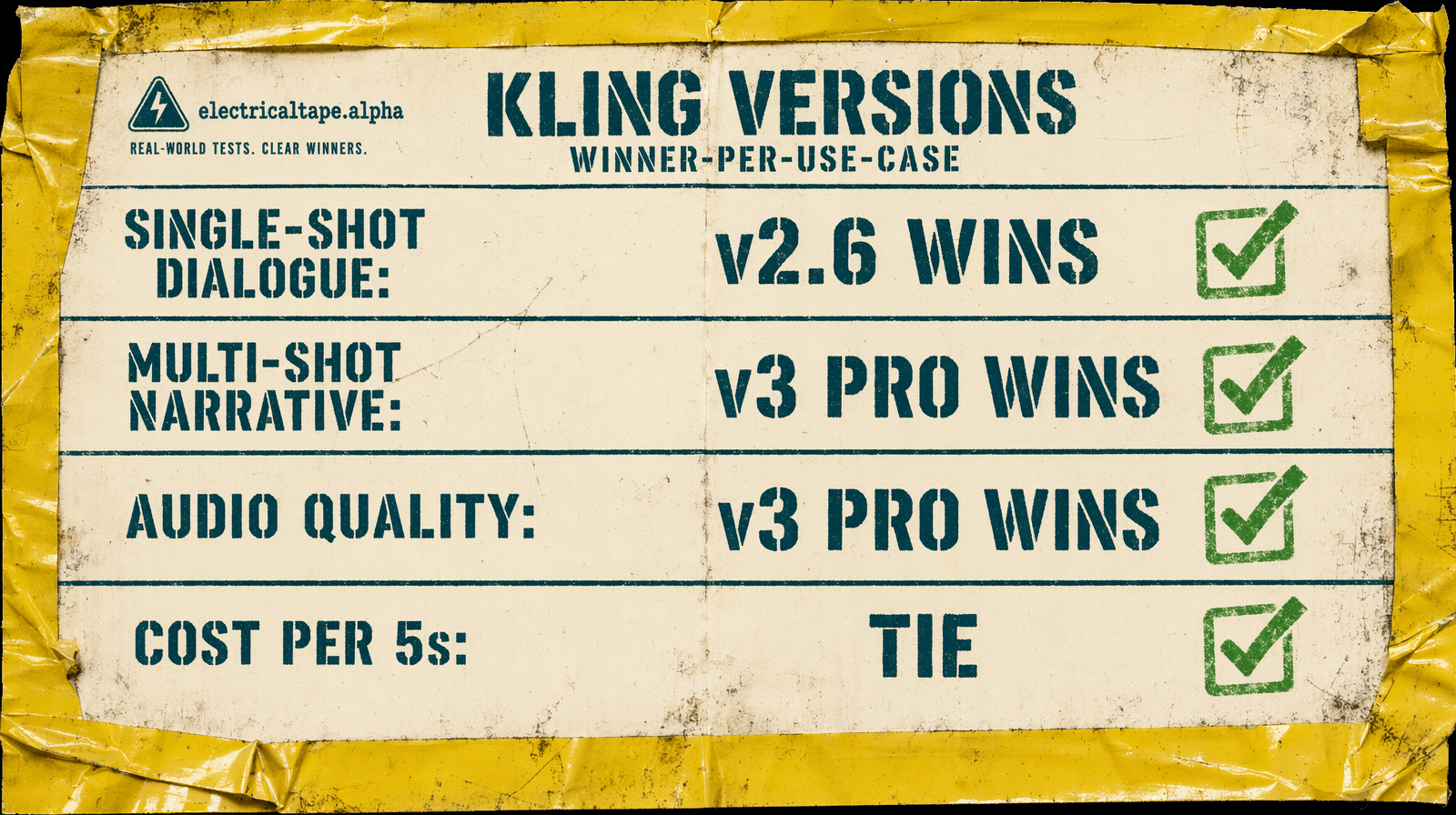
Single-shot dialogue with lip-sync: either model works, but v2.6 is simpler. You do not need the multi-shot structure, and v2.6's prompt surface is smaller.
Narrative with 3 or more beats: v3 Pro wins by elimination. v2.6 forces external stitching.
Duration between 5 and 10 seconds: either, v3 Pro gives you more granularity (6, 7, 8, 9 instead of just 5 or 10).
Cost per 5s clip: identical at $0.70.
Audio quality: v3 Pro is the newer audio model. If you are generating dialogue with mixed background, v3 Pro renders cleaner.
What to do if you already have a v2.6 pipeline
Keep v2.6 code paths for single-shot requests. Add v3 Pro as a second path specifically for multi-shot. Branch based on whether you have more than one beat in your storyboard.
Do not migrate blindly. The multi_prompt field requires structured input; if you pass a string where an array is expected, you get a validation error. A blanket find-and-replace from v2.6 to v3 Pro will break your batch.
The version bump is not one you skip. It is one you plan.